


Cybersecurity is everyone’s responsibility. If you receive a suspicious or potentially malicious email, don’t click anything — take action immediately by reporting it to our IT team.
Instructions
laptop and mobile
Laptop Application:
-
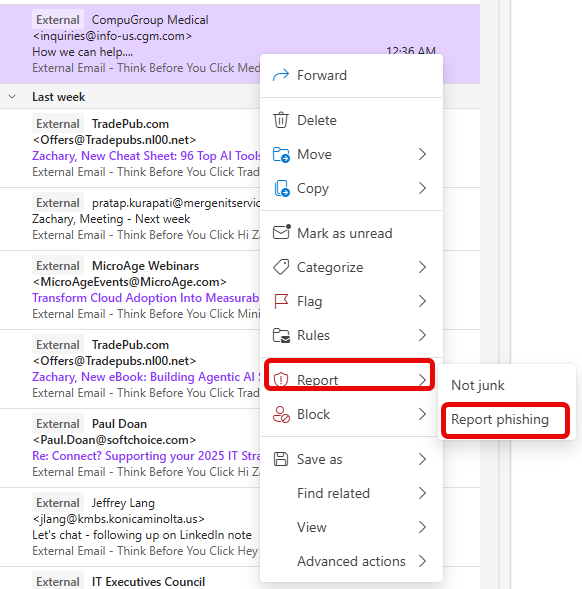
Right-click the suspicious message
-
Select Report > Report phishing. The message will be temporarily removed from your inbox.
-
An IT ticket will be raised with the information for the suspicious messages.
-
If we evaluate the message as phishing, we will take appropriate action. If we evaluate the message as safe, we will re-deliver the message to your inbox.
Mobile Application
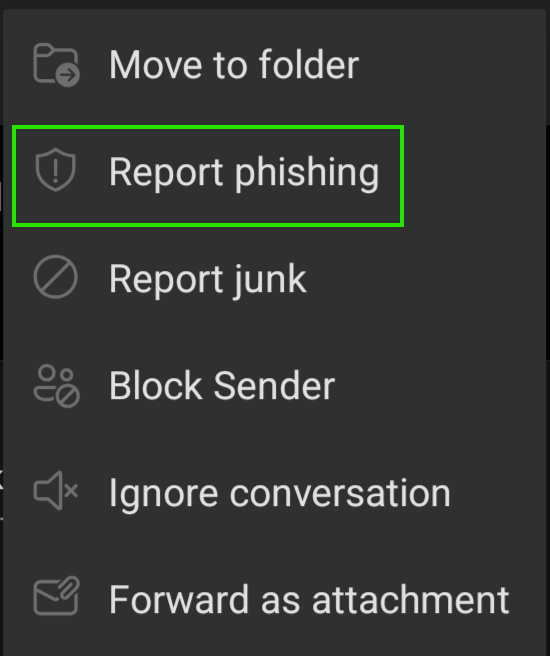
- Long press the email on the inbox to select it
- Click on the ellipsis "..." that appears on your screen when an email is selected
- Select Report Phishing
- Just like the laptop version, this will automatically generate a ticket for IT with the email and headers attached for IT to review.
Why It's Important
Phishing and email-based threats are one of the most common ways attackers infiltrate organizations. Reporting suspicious emails helps Nixon Medical stay ahead of potential threats and keeps our team and data secure.
If you’re ever unsure, it's better to report than to ignore. Thank you for helping protect our workplace!

