


Installing ABS Cloud Client

Feb 24, 2026
 0
0
To install the ABS Cloud Client (OCI), please follow these instructions:
1. Click this link: https://ashdownload.abssolute.net/Remotecl/NIX/NIXClient.exe
2. If the browser provides a warning, click keep and continue
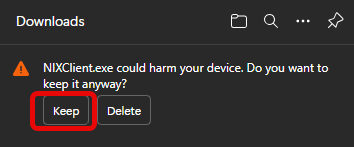
3. Complete the download and then launch the install wizard
4. Click Next on all the prompts until the wizard is complete.
5. Launch the ABS Cloud icon on your desktop

